Connections and controls
Power supply
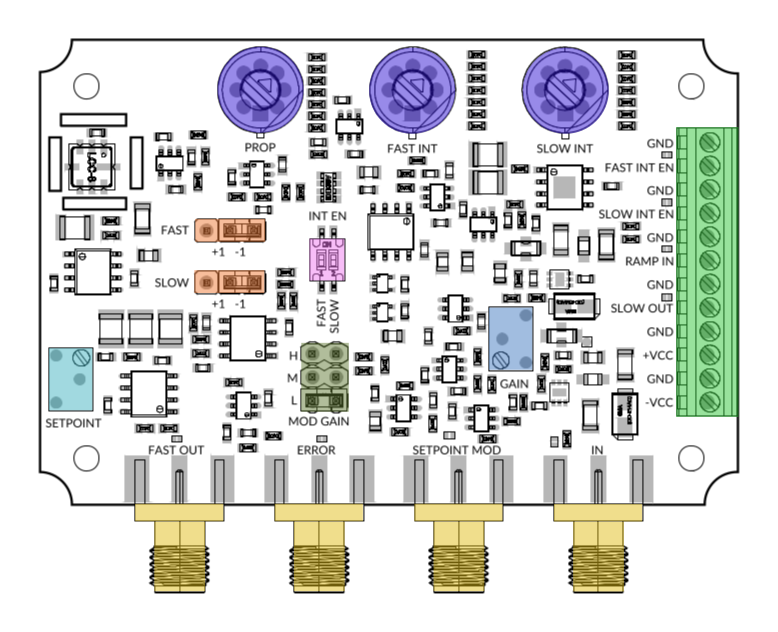
For nominal operation, supply the board with +5 V on the +VCC pin and -5 V on the -VCC pin. The allowed supply ranges are 4.75 V to 6 V and -6 V to -4.75 V. Use a regulated supply capable of delivering at least 220 mA per rail.
Warning: Do not exceed these ranges or reverse the supply polarity. Do not allow the exposed PCB or components to touch conductive surfaces.
Error signal and setpoint
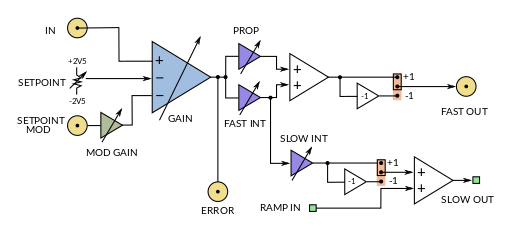
The GAIN trimmer adjusts the gain from the difference between IN and the setpoint to the ERROR output. This input gain is separate from the PROP setting in the loop filter.
On PI200 and PI200-T, the SETPOINT trimmer adjusts the setpoint between -2.5 V and +2.5 V. On PI200-ZS and PI200-T-ZS, the internal setpoint is fixed at 0 V.
SETPOINT MOD is a DC-coupled input that changes the setpoint. Its gain is 1 V/V, 0.1 V/V or 0.01 V/V with the MOD GAIN jumper in the H, M or L position, respectively.
Feedback sign
The FAST and SLOW jumpers select the polarity of FAST OUT and SLOW OUT (+1 or -1). Select each polarity so that the complete path through the corresponding actuator provides negative feedback. An incorrect polarity drives the loop away from the lock point when the integrator is enabled.
Integrator enable
FAST and SLOW integrators are enabled with the INT EN switch ON. When a switch is OFF, the corresponding integrator can be controlled through its FAST INT EN or SLOW INT EN pin: 0 V to 0.8 V disables it and 2.2 V to 4.5 V enables it.
Disabling an integrator limits its low-frequency gain instead of disconnecting its output. This facilitates lock acquisition with narrow capture error signals (see Section 1.4.3 of the NIST laser-frequency stabilization guide).
Ramp in
RAMP IN is passively mixed with the slow-path signal before the SLOW OUT buffer. Its contribution has a gain of approximately 1/2 with the SLOW sign jumper fitted and 1 with the jumper removed. Removing the jumper disconnects the slow correction path. See Why does PI200 RAMP IN amplitude decrease when the SLOW sign jumper is fitted? for details.
Input and output ranges
IN and SETPOINT MOD accept ±2 V signals and have 50 Ω input impedance. ERROR and FAST OUT deliver ±2 V into 50 Ω and have 50 Ω output impedance. SLOW OUT has 1 kΩ output impedance and should drive a high-impedance input.
Typical laser-locking setup
In a typical laser lock, FAST OUT drives a fast actuator, such as the CTL200 DC laser-current modulation input. SLOW OUT drives a slower actuator, such as laser temperature control or a piezo. With a PI200-T and CTL200, SLOW OUT can, for example, act through AIN2 for very slow temperature correction.
RAMP IN is mixed into SLOW OUT and is mainly useful for open-loop scanning of the slow actuator. SETPOINT MOD changes the servo error-signal setpoint instead; it is conceptually different from RAMP IN. Once locked, a scan or ramp is normally not part of the closed-loop operating condition.
In the laser-frequency-stabilization example, the initial scan used to locate the absorption feature is applied externally to the laser controller before the loop is closed. PI200 does not need to perform that initial wide scan.
Initial lock acquisition
- Start with FAST INT EN and SLOW INT EN switched OFF, and set PROP, FAST INT and SLOW INT to their lowest settings.
- Check that the FAST and SLOW feedback polarities are correct for their actuators.
- Bring the system close to the lock point with the setpoint or the appropriate actuator.
- Close the fast loop with FAST INT disabled, then enable FAST INT and increase its setting gradually while monitoring ERROR and FAST OUT.
- Enable SLOW INT at its lowest setting, allow the slow actuator to settle, then increase its setting as needed while monitoring ERROR, FAST OUT and SLOW OUT.
Reduce the corresponding setting if the loop rings or oscillates. Keep both outputs away from their voltage limits.
Tuning the frequency response
Adjust the loop filter using the three blue rotary switches. The menu options follow the clockwise switch positions; SLOW INT settings depend on the selected version.
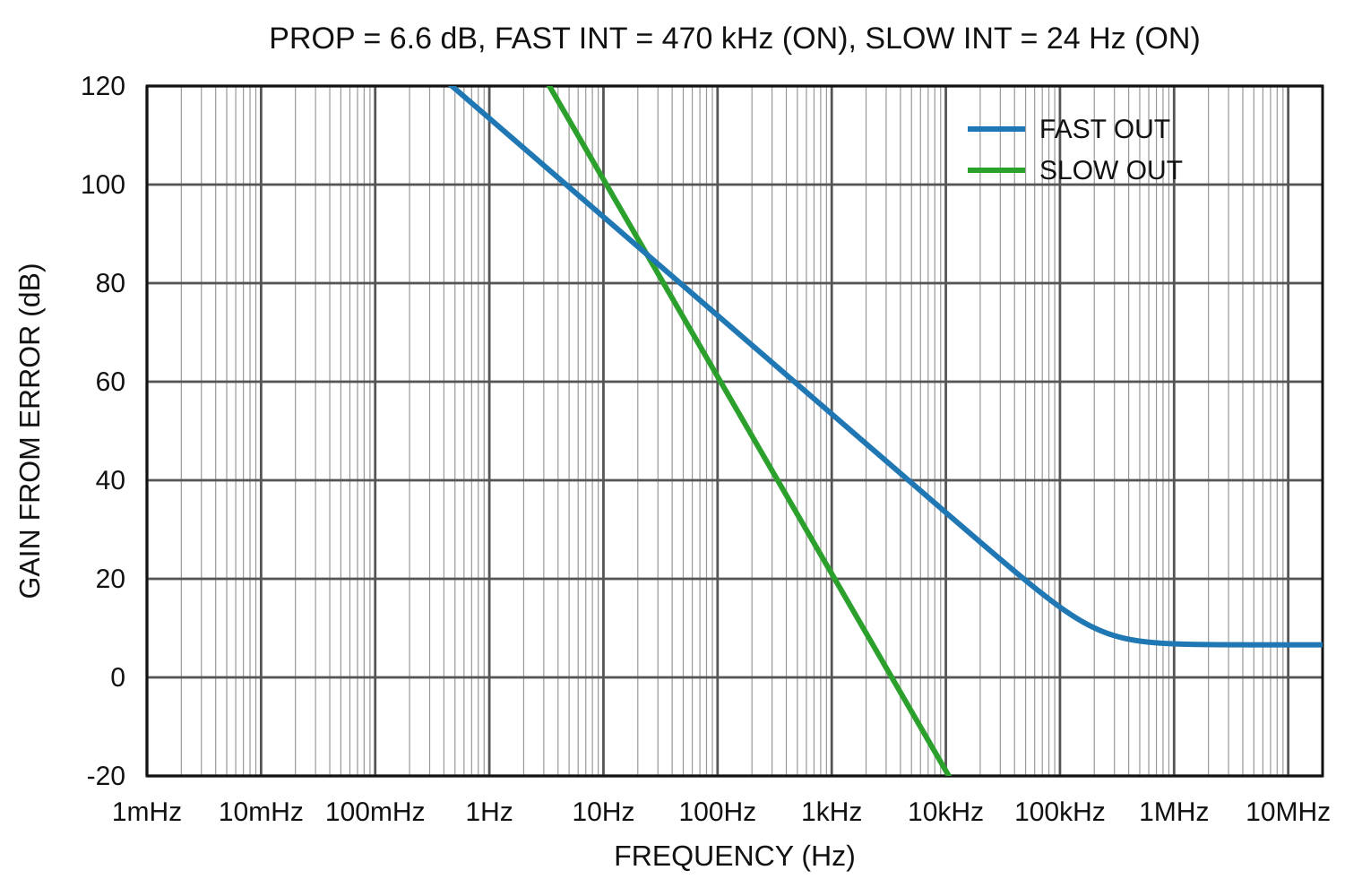
The graph shows the idealized response from ERROR to FAST OUT and SLOW OUT, with no signal applied to RAMP IN. The input GAIN trimmer is therefore not included. When an integrator is disabled, its low-frequency gain is limited. The model does not include the controller high-frequency roll-off. The complete closed-loop response also depends on the detector, actuators, laser and other electronics in the system.
FAQ
- How should I tune the PI200 slow integrator?
- What happens when the PI200 integrators are disabled?
- What is the difference between SETPOINT MOD and RAMP IN on the PI200?
- What should I connect the PI200 FAST OUT and SLOW OUT to?
- Why does PI200 RAMP IN amplitude decrease when the SLOW sign jumper is fitted?
- Why does the PI200 FAST OUT drift or saturate?
