Find the dynamic IP address of a Zynq board with Koheron OS
Last updated: 2026-10-04Prerequisites
- The board is connected to your local network via a router.
- Koheron OS is installed on the board.
To connect the board directly to your computer, set up a direct Ethernet connection to the board with a static IP address.
Steps
1. Find the network ID
$ ip addr show | grep -w inet | grep eth
inet 192.168.1.11/24 brd 192.168.1.255 scope global dynamic eth0
The network ID is the broadcast address brd with the parts equal to 255 stripped.
Here, the network ID is 192.168.1.
Go to Control Panel > Network and Internet > Network and Sharing Center.

Click on your connection then click on Details.

The IPv4 address (192.168.1.20) and the IPv4 Subnet Mask (255.255.255.0) give the network ID.
Here, the network ID is 192.168.1.
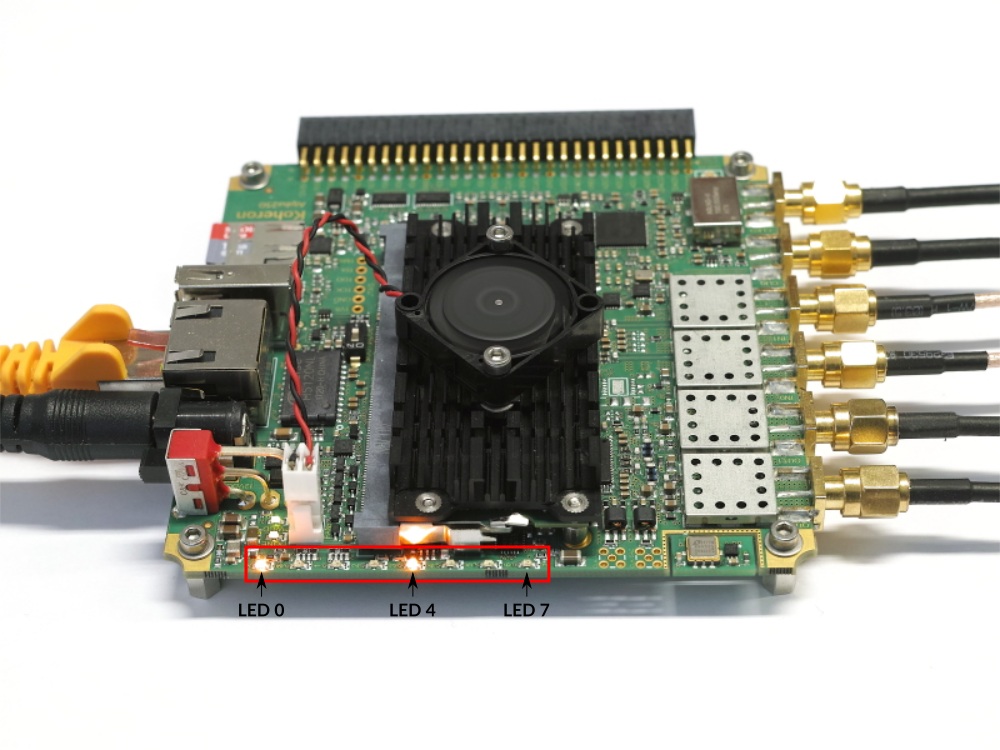
2. Find the host ID
The host ID is displayed in binary on the 8 LEDs of the board.
Conclusion
The IP address of the board is: 192.168.1.17.


